
Coronation Group
Coronation is a Nigerian financial services group spanning asset management, merchant banking, securities, life assurance, registrars and trustees. As part of a brand reinvention, I designed and developed the client dashboards that bring all of it into one place, so that an individual, an entrepreneur and a corporate client can each check their portfolio and discover new opportunities through the same simple experience.
Role
UX/UI Engineer
Year
2026
Platforms
Responsive Web App
Industry
Financial Services & Wealth
Task
Reinvent the Coronation client experience in line with the group's new look, which was still being developed alongside the project.
The wider programme was delivered in phases. I owned the dashboards in Phase B: the screens a client lands on after signing in, where they see what they hold, what needs their attention and what they could do next.
The brief was to simplify. Coronation serves three very different audiences, Personal, Entrepreneur and Corporate, and each needed to check their portfolio and investment opportunities without learning a different product. The dashboards also had to work inside an existing design system rather than start from scratch, so every decision needed to fit the system and push it forward at the same time.

Context
One client can wear several hats. Adesola, the persona used throughout the designs, invests personally, runs a trading business and sits on the board of a food company. Coronation wanted all of that to live behind a single sign in.
3
User contexts: Personal, Entrepreneur and Corporate, plus an All view that rolls them up
4
Product pillars that organise every holding: Grow, Bank, Protect and Plan
6
Group businesses surfaced in one place, from Asset Management to Registrars
50+
Screens and side panel states designed from one shared component set
The Challenge
The group's products were never the problem. The difficulty was presenting them to three audiences with different jobs, permissions and levels of complexity, without building three separate products.
Fragmented
Products spread across subsidiaries
Funds, accounts, policies and registry services each came from a different Coronation business. Clients had no single picture of what they held or what it was worth.
Divergent
Three audiences, three mental models
An individual thinks in savings and cover. An entrepreneur thinks in cash flow, compliance and team approvals. A corporate user often only needs to view. One layout could not serve all three as is.
Moving target
A brand still taking shape
The new look was under development while I designed. The dashboards had to sit on the existing design system and stay flexible enough to absorb brand changes without redesigning every screen.
My Role
I was responsible for the UX and UI of the Phase B dashboards, from structuring the information through to high fidelity screens and every interaction state. I also developed the front end, which is covered in Part 2 of this case study.
Audit
Existing system review, component gaps, context mapping
Information architecture
Grow, Bank, Protect, Plan model and navigation per context
Component strategy
Reusable components that behave the same in every dashboard
Theming
Context colours, role badges and permission states
UI design
Dashboards, module pages and all side panel flows
Front end development
Building the dashboards in code
Design Process

One System, Three Contexts
My thinking was component first. If the three dashboards were built from the same pieces, a client switching from their personal view to their business would already know how everything works. What changes is the layout, the content and the colour, never the behaviour.
Every dashboard follows the same order: who you are, what you hold, what needs attention, then your products by pillar.
Same anatomy everywhere
A Corporate client sees fewer cards and different modules, but each card is the same component a Personal client uses.
Layout changes, components don't
Each context carries its own accent from the design system, so the active context is obvious at a glance without extra labels.
Colour tells you where you are
An Admin, Owner or Viewer sees the same card. Only the available actions change, so nobody wonders where a feature went.
Permissions shape state, not structure
Designing the component once and letting context decide the colour and layout meant three dashboards cost little more than one, and felt like one product.
Information Architecture
Instead of organising the dashboard around Coronation's subsidiaries, I organised it around what the client is trying to do with their money.
Grow holds investments, funds and securities. Bank holds accounts, payments and treasury. Protect holds insurance and life cover. Plan holds trusts, registry and retirement. Each pillar shows its total, its products as cards, and an empty state with a clear starting point when there is nothing there yet, turning gaps into investment opportunities.



The All View
A single context switcher at the top of the sidebar lets a client move between Personal, each business and an All view that rolls everything up.


Transactions. One ledger across contexts with filters for inflow and outflow.

Statements. Reports, contract notes and trust records, filterable by category.

Actions in context. Flows open in a side panel over the dimmed dashboard.
The All view answers the question a multi hat client actually asks first: what am I worth across everything? It shows total position across every context, allocation by entity and quick filters for each one. Product cards keep the colour of the context they belong to, so a personal fund and a business account can sit side by side without confusion.

Investments in the All view, with each product card coloured by the context it belongs to.
Three Dashboards
The same structure, adapted to each audience. Select a context to compare.

Corporate
For a corporate user with view only access. The layout is the business layout, but the components switch to their read only state.
Overview
Accounts & Treasury
Payments
Compliance
Shareholders
Team & Access
Team & Access
-
Cards show a single View action with a quiet "View only" label
-
Empty Protect pillar becomes an opportunity: Protect My Business
-
Orange accent for the corporate context

Entrepreneur
For the business owner who is also the administrator. The dashboard leans into running the business: cash, payments, compliance, shareholders and who on the team can approve what.
Overview
Accounts & Treasury
Payments
Compliance
Shareholders
Team & Access
Team & Access
-
CAC verification nudge, because banking stays locked until the company is verified
-
Business actions on cards: Pay, Manage users, Statements
-
Teal accent for the business context

Personal
For the individual managing their own wealth. The language stays plain and the actions are the everyday ones: top up, trade, transfer, manage cover and contribute.
Dashboard
Holdings
Transactions
Insurance
Payments
Documents
-
Allocation shown by asset class: equities, balanced and fixed income
-
All four pillars visible, with a nudge to pick up an unfinished quote
-
Purple accent marks the personal context throughout
Reusable Components
Every block on the dashboards is designed once and reused. Each component has a small set of variables: the context it sits in, the role of the person viewing it and the data it holds. Everything else stays fixed, which is what makes the three dashboards feel like one product.
Context accent
The base bar, labels and chips take the context colour.
Role decides actions
Owner, Admin and Viewer see the same component with different buttons.
Content follows context
Offers, advisors and approvals change to suit who is looking.
One action style
Gradient primary, outlined secondary, in the same order everywhere.
Portfolio summary & allocation
The first thing every client sees. One summary card renders four ways: the All view lists every context as a filter chip, while Personal, Entrepreneur and Corporate show their own label, role badge and accent bar.
The allocation card pairs with it, switching between allocation by entity in the All view and allocation by asset class inside a single context.
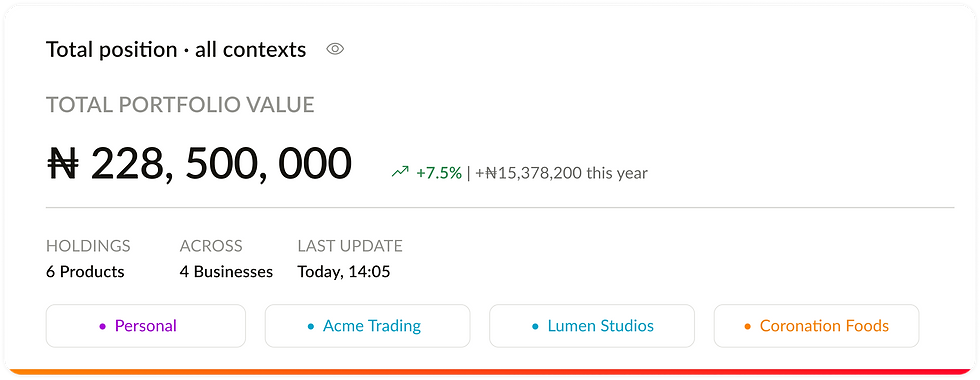


Summary: All, Personal (Owner), Entrepreneur (Admin), Corporate (Viewer)


Allocation by entity and by asset class
Portfolio performance
A single chart component with time range chips from one month to all time. The line picks up the brand gradient, so performance reads as Coronation in every context, while the value and growth figure follow the selected view.
Product card
The workhorse of the Grow, Bank, Protect and Plan pillars, rebuilt here in code. One component: the context sets the accent and the role sets which actions appear, down to a read only Viewer state and an empty state that turns a gap into an opportunity.


Portfolio performance with 1M, 3M, 6M, 1Y and All ranges
Right rail modules
Pending approvals, Continue your journey, Grow with Coronation and Your advisors sit beside the pillars. Each collapses to a single line and expands in place, so the rail stays quiet until it is needed.
The modules are the same in every dashboard, but their content is matched to the context. A personal client is offered motor cover or a family trust, an entrepreneur sees business all risk and key person cover, and a corporate user sees capital raising and staff pensions, each tagged "For you".
People & activity
Coronation's service is personal, so the people behind it get their own components: a relationship manager card with a booked review, an advisor card, an activity log of what the team has done, and an approval card with Details, Approve and Reject in a fixed order.

Collapsed and expanded states, with context matched offers

Relationship manager, advisor, activity log and pending approval
KPI tiles & compliance status
KPI tiles share a label, period, figure, supporting line and a progress bar on the gradient. The compliance status block reuses the same tile for each filing, adding an Up to date or Resolve state so business users know exactly what needs action.
Feature banners
A full width banner for moments that deserve more space than a nudge: introducing Priority Support, a Coronation Trustees offer, or confirming that a Merchant Bank account is linked and sweeping into the Money Market Fund. Imagery, headline, supporting copy and one or two actions, always in the same layout.

Income, net return and best performer tiles above the compliance status block

Priority Support, Coronation Trustees and Connected banners
Side Panels
Every action opens in a side panel over the dashboard rather than a new page. The client never loses sight of where they started, and every flow reads the same way.
Header
Brand gradient edge, icon, action title and the product or provider it relates to.
Progress
A stepped bar for multi step flows such as verification and planning.
Body
Inputs, quick amount chips and a clear summary of fees and totals before committing.
Footer
One gradient primary action and an outlined secondary, always in the same place.
Flow example: CAC verification
Business banking and registry services stay locked until a company identity is verified with the Corporate Affairs Commission. Rather than send the client to a separate onboarding journey, the nudge on the dashboard opens a four step panel.


Trade securities, buy or sell with estimated value
Trade securities, buy or sell with estimated value
Fund detail, value, performance and recent activity
Manage users, team access for business admins


Company details
Name and RC number, with a short note on why it is needed.
Upload documents
Certificate, status report and memorandum.
Review
A summary before submitting.
Confirmation
Clear next steps and expected turnaround.
Business Modules
The Entrepreneur and Corporate contexts add modules that only a business needs. They are assembled from the same KPI tiles, tables, status pills and side panels as the rest of the product.


Compliance. Status at a glance, a filing calendar with days remaining and the Coronation team behind each obligation.
Shareholders. Cap table, free float and dividend history, powered by Coronation Registrars.
Team & access. Members, roles, approval limits, pending invites and security controls such as dual approval.
Design System
I worked within Coronation's existing design system and fitted the dashboards to it, extending it where the dashboards needed something new.
The key addition was a context layer. The brand gradient stays constant for primary actions and system moments, while a single context accent flows into the parts of a component that signal ownership: the card's base bar, its icon tile and the active state of tabs and filters. Because components reference the context token and not a fixed colour, the same component renders correctly in any dashboard, and a brand update lands everywhere at once.
// primitives
{ "color": {
"purple": { "600": { "$type": "color", "$value": "#A60BD5" } },
"teal": { "600": { "$type": "color", "$value": "#129BBD" } },
"orange": { "500": { "$type": "color", "$value": "#FF8200" } } } }
// theme: personal (entrepreneur and corporate swap the reference)
{ "context": {
"accent": { "$type": "color", "$value": "{color.purple.600}" },
"surface": { "$type": "color", "$value": "{color.purple.50}" } } }
// component: product card
{ "card": { "product": {
"bar": { "$type": "color", "$value": "{context.accent}" },
"iconBg": { "$type": "color", "$value": "{context.surface}" } } } }
Ink
#15140F
Surface
#F7F7F5
Positive
#1E9A4A
Personal
#A60BD5
Entrepreneur
#129BBD
Corporate
#FF8200
All view
Entity colours in charts
Brand
Context accents
Typography in product
₦228,500,000
Portfolio value / Black
Good Afternoon, Adesola
Page greeting / Bold
Coronation Balanced Fund
Card title / Bold
Total portfolio value
Overline / Regular
Investments, funds & securities
Supporting text / Regular
Brand
Context Accents
Design Takeaways
The design result is one product that feels personal to three very different clients. A person who switches context does not have to relearn anything, and whoever builds one dashboard has effectively built the other two. That last point is exactly what Part 2 puts to the test.
1
Component library
Shared across Personal, Entrepreneur, Corporate and the All view, with context and role as the only variables.
4
Pillars, one mental model
Grow, Bank, Protect and Plan give every client the same way to read their money, whatever they hold.
1
Pattern for every action
The side panel handles payments, trades, quotes and verification, keeping the dashboard always in view.
What I learnt
Designing alongside a brand that is still evolving rewards restraint. By keeping colour in tokens and decisions in components, changes to the new look become updates rather than redesigns.
What I would explore next
Usability testing with clients who hold more than one context, to validate the switcher and the All view, and a deeper look at how the right rail could personalise opportunities over time.
Discover More


